This guide is for people who use the Gemini app with a personal Google Account. Connected Apps let Gemini find information in your other apps and take actions there: summarizing emails from Gmail, creating events in Google Calendar, playing music from YouTube Music or Spotify. Google announced Customize on October 13, 2026: a menu where you set how Gemini responds and which everyday tools it connects to, in one place.
Below: what you can connect, where the list lives on the web and on your phone, how to connect or disconnect an app, and what stops working when Keep Activity is off. Customize also holds skills, which this guide leaves out.
What you can connect to Gemini
Gemini can connect to more than 40 apps or services, for jobs like ordering groceries on Instacart, reserving a table on OpenTable and editing photos with Adobe. Connected Apps also cover everyday ones: Gmail, Google Calendar, YouTube Music, Spotify, calls and messages with WhatsApp on Android devices, and smart home devices in Google Home.
How much of that you get depends on where you are and which language you use. Customize itself “is rolling out globally across web, mobile, and the Gemini desktop app on Windows and macOS, for all user tiers.” The apps are narrower: “Most connected apps are available in English in the U.S., with select apps available in additional English-speaking regions, Brazil, and India.”
Each app has its own availability and requirements: account types, ages, locations, languages, any required Google AI subscription, and the Gemini apps it works in. Here are six of them as of November 12, 2026.
| App | Locations | Languages | Account type |
|---|---|---|---|
| Google Workspace (Gmail, Google Calendar, Google Drive and more) | All countries and territories where Gemini Apps and Google Workspace services are supported | All languages supported by the Gemini web app | Personal, work, or school |
| YouTube Music | All countries and territories where Gemini Apps and YouTube Music are supported | All languages supported by the Gemini web app | Personal, work, or school |
| Spotify | All countries and territories where both the Gemini mobile app and Spotify app are supported | All languages supported by the Gemini mobile app | Personal only |
| Instacart | US only | English only | Personal only |
| OpenTable | UK and US only | English only | Personal only |
| Adobe | All countries and territories where Gemini Apps and the third-party app are supported | English only | Personal only |
Where each app works differs too. Spotify is supported in the Gemini mobile app only. Instacart is supported in the Gemini web app, the Gemini mobile app, the Gemini app for Windows and Gemini in Chrome.
That is why your list can look different on another device. The apps in Connected Apps settings “vary by Gemini app, device, country, and more.” Apps that are only available in the Gemini mobile app on Android won’t show on iOS devices or in the Gemini web app.
Where to find Connected Apps: Customize, then Connectors
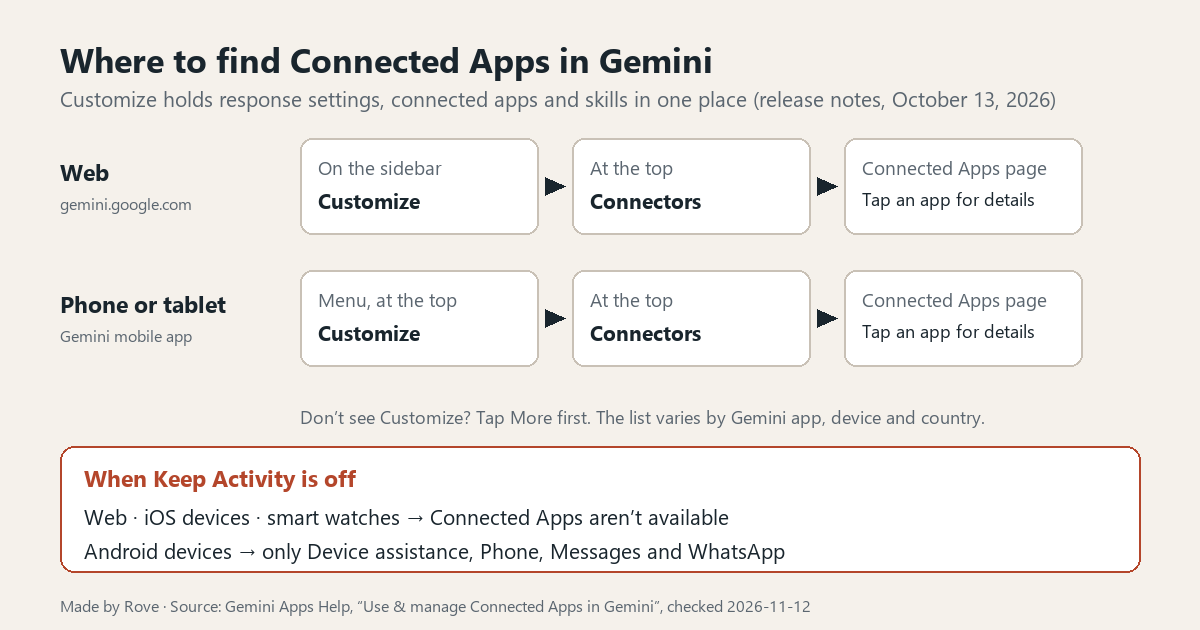
- On a computer: go to gemini.google.com, click Customize on the sidebar, then click Connectors at the top.
- On a phone or tablet: open the Gemini mobile app or go to gemini.google.com, tap Menu at the top, then Customize, then Connectors at the top. The steps are the same on Android and on iPhone and iPad.
- If you don’t find Customize, tap More first.
The Connected Apps page lists the apps that are available to you, your Google Account type and the Gemini app you’re currently in. Tap an app to open its details page, with a full description, supported and unsupported actions, and example prompts. Use & manage Connected Apps in Gemini
How to connect or disconnect an app
- Open the Gemini mobile app or go to gemini.google.com.
- Open Customize (on the sidebar on a computer, under Menu at the top on a phone or tablet).
- At the top, choose Connectors and find the app you want.
- To connect it, tap Add.
- To disconnect it, tap More options, then Disconnect.
- Follow any on-screen instructions.
You can also connect from a chat. Enter @ in your prompt and select an app. If that app isn’t connected, it will either be connected or Gemini will ask for your permission to connect it. You don’t have to name an app at all: if one is available, Gemini uses it automatically.
Some Connected Apps are designed to automatically work with Gemini. It’s worth opening Connectors even if you’ve never added an app. You can disconnect apps there anytime.
You can also connect personal or third-party apps by linking their Model Context Protocol (MCP) server. The custom app then appears in your Connected Apps settings. Before you connect one, make sure you trust that third party and understand its supported actions. Google “does not control, monitor, or secure these servers.”
What disconnecting an app doesn’t change
Your saved activity. Disconnecting an app or deleting data in a connected app doesn’t delete any data from Gemini Apps Activity. You review and delete that activity separately, in Gemini Apps Activity.
What the app already received. “Apps retain data that Gemini shares with them subject to their own policies.” Deleting data in Gemini Apps Activity also “doesn’t delete data that other apps have received from Gemini.”
Public information. Gemini automatically uses public information from certain Google services, including Google Search, Google Flights, Google Hotels, Google Maps and YouTube. Connected Apps settings don’t change that. Gemini “won’t access your personal information or content in these services without your permission.”
What stops working when Keep Activity is off
You must be signed in to use Connected Apps. Apart from four apps on Android, they also need Keep Activity turned on. With the setting off, this is what’s left.
| Where | With Keep Activity off |
|---|---|
| Web (gemini.google.com) | Connected Apps aren’t available |
| iOS devices (iPhone and iPad) | Connected Apps aren’t available |
| Smart watches | Connected Apps aren’t available |
| Android devices | Only Device assistance, Phone, Messages and WhatsApp are available |
Keep Activity is the setting that saves your chats, and what you share with Gemini, to your Activity. With it on, Google uses that activity to provide, develop, and improve its services, including training generative AI models. With it off, your future chats won’t appear in your Activity and won’t be used to train Google’s AI models unless you choose to send Google feedback. Those chats are still saved for 72 hours.
So the trade-off is plain. Turn Keep Activity off and you lose Connected Apps everywhere except those four Android apps. Turning it back on “restores Gemini’s access to apps that were previously connected.”
Public information follows the same switch, with one exception. Gemini needs Keep Activity on to use public information from Google Flights, Google Hotels, Google Maps and YouTube. It can always use public information from Google Search, even if Keep Activity is off or you’re signed out.
If you use a work or school account
Everything above is for personal accounts. Work and school Google Accounts have separate instructions for Connected Apps, so start with those and with your administrator’s policy. Account type also differs app by app: Google Workspace and YouTube Music accept personal, work, or school accounts, while Spotify, Instacart, OpenTable and Adobe are for personal Google Accounts only.
Five things to check
- Open Customize, then Connectors. Customize is on the sidebar on a computer and under Menu at the top on a phone or tablet.
- Look at what’s connected. Some Connected Apps are designed to automatically work with Gemini.
- Disconnect what you don’t use with More options, then Disconnect. That doesn’t delete anything from Gemini Apps Activity, and it doesn’t change Gemini’s use of public information from services like Google Search.
- With Keep Activity off, Connected Apps aren’t available on the web, iOS devices or smart watches.
- Check each device you use. The list varies by Gemini app, device and country.
Sources
- Use & manage Connected Apps in Gemini: where the settings are, connecting and disconnecting, Keep Activity, public information
- Check the availability & requirements of Connected Apps in Gemini Apps: locations, languages, account types and supported Gemini apps for each app
- Gemini Apps Privacy Hub: what Keep Activity controls, and what happens to data when you disconnect an app
- Gemini release notes: the October 13, 2026 entry on Customize and more than 40 connected apps
Some Connected Apps are designed to automatically work with Gemini. With the controls under Customize, open Connectors once and see what’s on.
Leave a Reply