This post is about the Gemini app on a personal Google Account. If your account comes from work or school, your use of Gemini Apps may be subject to different data handling terms. In that case, check with your work or school admin before you go by anything here.
Whether a work file may go into Gemini on a personal account is decided by your company’s rules and by who has rights over that file. This post doesn’t make that call. It only lays out how the settings you’d check before uploading handle your data, based on Google’s Gemini Apps Privacy Hub as it read on November 12, 2026 (last updated October 26, 2026).
Human review, use, retention and deletion are four separate things
“A person reads it,” “it’s kept” and “it’s deleted” tend to get lumped together. There are four different things going on.
- Human review to improve services: A subset of chats is reviewed by human reviewers, including Google’s trained service providers, to help improve Google services. Chats are disconnected from your account before they are sent to service providers. The setting that stops this review for your future chats is Keep Activity.
- Use to respond and to protect: Even if Keep Activity is off or you use temporary chats, Google still uses your chats to respond to you and to help protect Google, its users and the public, including with help from human reviewers.
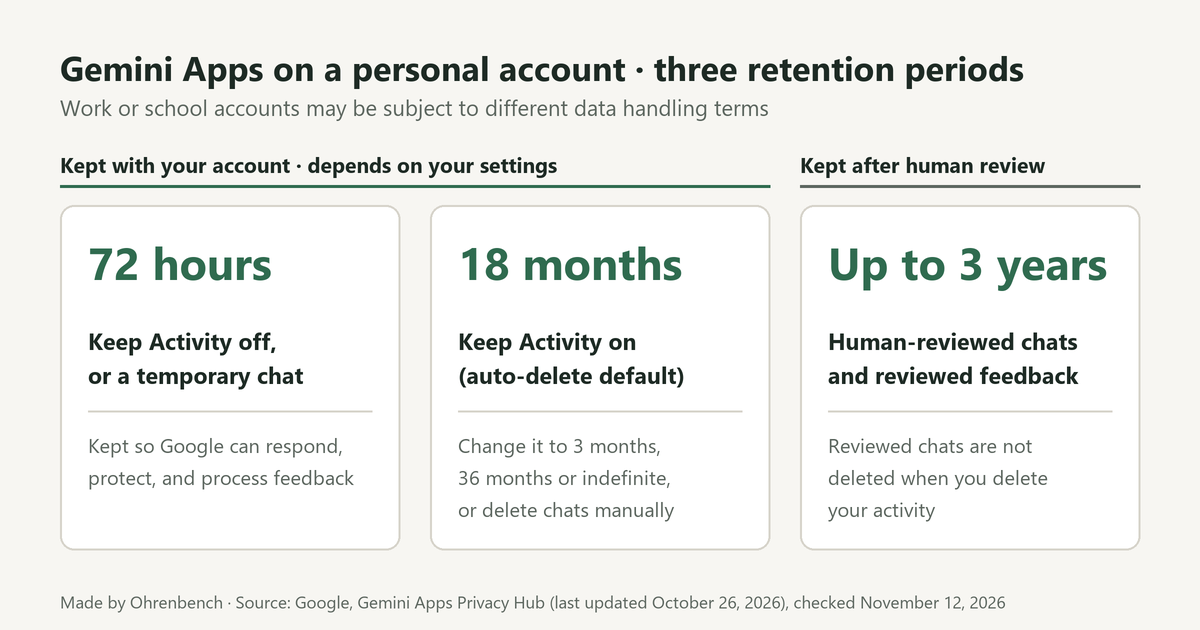
- Retention: How long chats stay with your account depends on your settings. With Keep Activity off, or in a temporary chat, it’s 72 hours. With Keep Activity on, activity is auto-deleted after 18 months by default. Separately, chats that human reviewers have reviewed are retained for up to three years. So is reviewed feedback, which Google keeps disconnected from your Google Account.
- Deletion: Deleting your activity doesn’t delete chats that human reviewers have already reviewed. They are retained for up to three years. Chats already reviewed by service providers aren’t deleted because they aren’t connected to your Google Account.
So two common beliefs don’t hold:”with Keep Activity off, no person ever sees my chats” and “with Keep Activity off, my chats are deleted right away.”
Keep Activity on, Keep Activity off and temporary chats, side by side
| Item | Keep Activity on | Keep Activity off | Temporary chat |
|---|---|---|---|
| How long chats stay with your account | Auto-deleted after 18 months (default). You can change this to 3 months, 36 months or indefinite | 72 hours | 72 hours |
| Service improvement and AI training | Used. Human reviewers review a subset of chats, and activity is also used to train generative AI models | Future chats aren’t used to improve Google’s AI models unless you submit feedback | Not used to train Google’s AI models |
| Responding to you and protection | Used, including with help from human reviewers | Used, including with help from human reviewers | Used, including with help from human reviewers |
With Keep Activity on, your chats and what you share with Gemini, like uploads and screens, are saved in your activity. While that setting is on, don’t enter data that’s confidential, or that you wouldn’t want a reviewer to see or Google to use to improve its services.
Sending feedback is handled differently, even with Keep Activity off
If Keep Activity is off and you choose to submit feedback, Google collects and uses the following to help maintain and improve Gemini Apps.
- Your feedback
- Context that helps Google understand your feedback, including the last 24 hours of your chats
- Any content included in those chats, like uploads and data from Connected Apps
Reviewed feedback, associated conversations and related data are retained for up to 3 years, disconnected from your Google Account. So if you send feedback from a chat where you uploaded a file, that file can be collected along with it.
What stays after you delete your Gemini activity
- Chats already reviewed by human reviewers, and related data like your language, device type, location info or feedback, are not deleted when you delete your activity. They are retained for up to three years.
- Some data is kept until you delete your Google Account, such as information about how often you use Gemini Apps.
- Some data is kept longer when it’s needed for legitimate business or legal purposes, such as security, fraud and abuse prevention, or financial record-keeping.
- Deleting your Gemini Apps activity doesn’t delete data saved in other Google services.
Checklist before you upload a work file to Gemini
- Check whether you’re signed in with a personal account or with one from work or school. With a work or school account, follow your admin’s guidance.
- Check your company’s rules, or ask whoever is responsible for the file, whether it may go into an AI tool on a personal account.
- Open Gemini Apps Activity and see whether Keep Activity is on. If it is, the files you upload are saved in your activity too, and some of your chats can be reviewed by people to improve Google services.
- Go in knowing that with Keep Activity off, or in a temporary chat, chats are still kept for 72 hours, and Google still uses them to respond and to protect, including with help from human reviewers.
- Remember that sending feedback from a chat where you uploaded a file can collect what you uploaded in that chat as well.
- Before you delete anything, remember that chats already reviewed stay even after you delete your activity.
Further reading
- Gemini Apps Privacy Hub: what data is collected, human review, retention periods, Keep Activity and temporary chats
No single setting makes an upload “safe.” It’s more accurate to check two things separately: whether your company allows it, and what these settings actually change.
Leave a Reply