This post is for developers who call voice models through the Gemini API. As of November 12, 2026, Google’s Gemini deprecations page lists November 17, 2026 as the shutdown date for five voice preview models. Three are text-to-speech (TTS) models that turn text into audio, and two are Live API models for real-time voice conversations.
This is not news about the Gemini app. The page lists deprecation schedules for models and managed agents in the Gemini API, where your code calls a model by name. It says nothing about turning off voice features in the Gemini app.
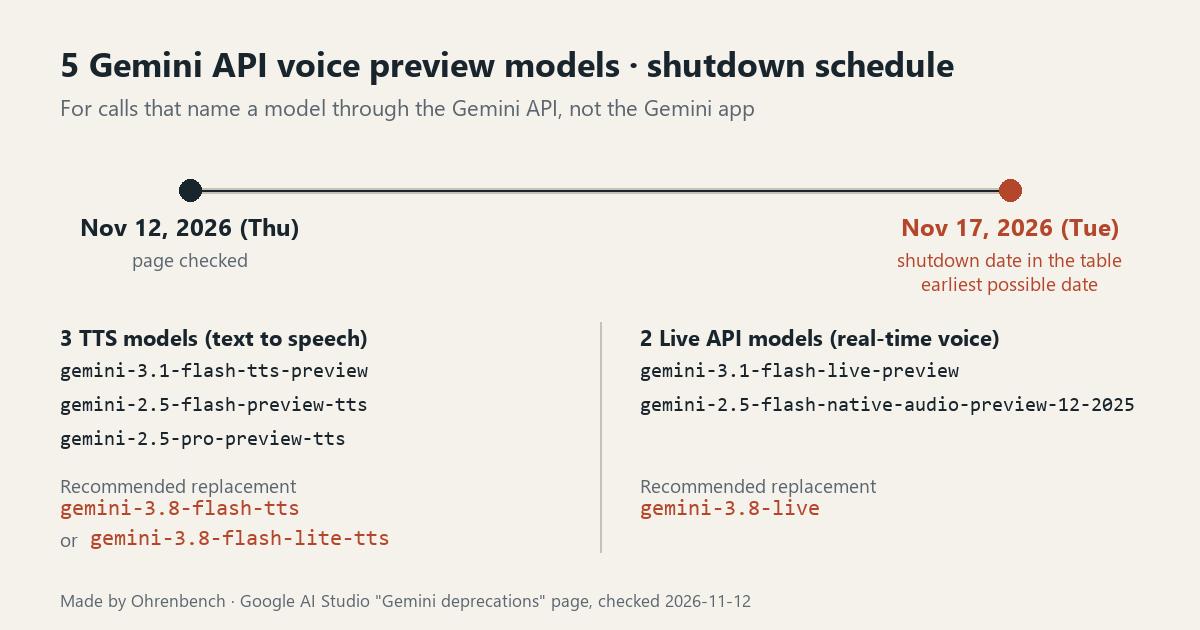
The five models and their recommended replacements
| Model name | Type | Released | Shutdown date listed | Recommended replacement |
|---|---|---|---|---|
gemini-3.1-flash-tts-preview |
TTS | February 26, 2026 | November 17, 2026 | gemini-3.8-flash-tts or gemini-3.8-flash-lite-tts |
gemini-2.5-flash-preview-tts |
TTS | May 20, 2025 | November 17, 2026 | gemini-3.8-flash-tts or gemini-3.8-flash-lite-tts |
gemini-2.5-pro-preview-tts |
TTS | May 20, 2025 | November 17, 2026 | gemini-3.8-flash-tts or gemini-3.8-flash-lite-tts |
gemini-3.1-flash-live-preview |
Live API | March 11, 2026 | November 17, 2026 | gemini-3.8-live |
gemini-2.5-flash-native-audio-preview-12-2025 |
Live API | December 12, 2025 | November 17, 2026 | gemini-3.8-live |
The list is exactly these five names. Having live or preview in a model name doesn’t put it on the list. In the same table as the two Live API models, gemini-3.5-live-translate-preview shows “No shutdown date announced.”
A shutdown is not an automatic redirect
The page spells out what a shutdown means: once a model is shut down, “it is completely turned off, and the endpoint is no longer available.”
Other rows on the same page work differently. The gemini-2.5-flash row, for example, says that effective December 1, 2026, API requests to gemini-2.5-flash “will automatically route to” gemini-3.5-flash-lite. The five voice rows carry no note like that. They give a recommended replacement and nothing more. Nothing on the page says a newer model will answer in place of an old name you leave in your code.
November 17 is the “earliest possible” date
A note on the page says the shutdown dates in the table are the “earliest possible dates” on which a model might be retired, and that Google will give users the exact shutdown date with advance notice. The table shows a date only, with no time of day and no time zone. Announced dates are tracked on this page, so open it once more right before you migrate.
TTS: swapping the model name is not enough
The two Gemini 3.8 TTS models share the same API schema and prompting structure. The choice between them comes down to workload.
gemini-3.8-flash-tts: the listed strengths are voice fidelity, acting nuance and dialect coverage, with 130 supported languages. Audiobooks and complex multi-speaker dialogue are among the listed use cases.gemini-3.8-flash-lite-tts: the listed strengths are high throughput, low latency and cost efficiency, with 101 supported languages. Listed use cases include high-volume production, read-aloud features and everyday single-speaker generation. The comparison table on the model pages names Flash-Lite TTS as the recommended replacement forgemini-3.1-flash-tts-previewand describes Flash TTS as a new flagship creative tier.
The migration guide on the Flash TTS page applies to anyone moving from gemini-3.1-flash-tts-preview “or earlier Gemini TTS models.” The Flash-Lite TTS page lists the same steps. Here is what changes:
- Directions written into the text may be read aloud. Gemini 3.8 TTS treats input text strictly as a verbatim transcript, so lines like “Say cheerfully: Hello!” or “Speaker 1: Hello!” may be spoken. Move delivery instructions to
styleand speaker labels tospeakerinsidespeech_metadata. - Angle-bracket tags are only for momentary sounds and pauses. Keep tags such as
<laugh>,<sigh>or<short pause>inline in the text. A delivery style such as whispering goes inspeech_metadata.style. - Multi-speaker requests need
speakeron every turn, matching one of the configured speakers. - Long persona blocks move to Voice design. The guide says to replace long legacy Audio Profile or Director’s Notes blocks with a custom voice created in Voice design, then carry that voice ID through your TTS requests.
- The default output changes.
gemini-3.1-flash-tts-previewand earlier TTS models returned headerless raw PCM (audio/l16) by default. Gemini 3.8 TTS returns WAV (audio/wav) with a standard RIFF header by default for unary requests. If your code wrapped the PCM bytes in a WAV header, remove that step. If your pipeline needs headerless PCM, ask for it explicitly: setresponse_format.mime_typetoaudio/l16in the Interactions API, or useAUDIO_L16ingenerateContent.
Live API: review your session setup first
The gemini-3.8-live page has a section titled “Migrating from Gemini 3.1 Flash Live.” If you call gemini-3.1-flash-live-preview, work through this list:
- Change the model string to
gemini-3.8-live. thinking_levelis not supported. Omitthinking_levelandthinking_configfrom your session setup. If your application needs configurable reasoning, the page points togemini-3.8-live-extended-thinking.- Function calling is asynchronous by default (
NON_BLOCKING). For synchronous behavior, setBLOCKINGon your tool declarations. send_client_contentis supported for the whole session, with explicituserormodelroles. Settingturn_complete=trueinterrupts active model generation. Withoutturn_complete, the server waits for more messages before responding.- Proactive audio is permanently on. Setting
proactive_audio: falsereturns an error, so leave the setting out. - Affective dialogue is removed from the API. Delete any
enable_affective_dialogsettings. - Audio is the only supported response type. If you need a text transcript, enable
output_audio_transcription. - Video frames are sent to the model by default. Send frames only when needed to manage context and cost.
The gemini-3.8-live page has no separate section on moving from gemini-2.5-flash-native-audio-preview-12-2025. Don’t assume the list above carries over unchanged. The same page points to a model comparison table covering all Live API models, so check each feature you rely on against it.
Five things to check before November 17
- Check whether the model name you call is one of the five, down to suffixes like
-previewand-12-2025. - Sort each call into TTS or Live API. The recommended replacements differ.
- For TTS, pick Flash or Flash-Lite by workload, and make sure the code that receives the audio expects the right format, WAV or PCM.
- For the Live API, look for settings that no longer work (
thinking_level,proactive_audio: false,enable_affective_dialog) and check the function calling default. - Send a request with the new name, check the audio and the response format, and reopen the deprecations page right before you switch.
Official pages
- Gemini deprecations: shutdown dates, recommended replacements and the “earliest possible dates” note
- Gemini 3.8 Flash TTS: comparison of the two TTS models and the migration guide
- Gemini 3.8 Flash-Lite TTS: the same comparison from the Flash-Lite side and its migration guide
- Gemini 3.8 Live: migrating from Gemini 3.1 Flash Live
November 17, 2026 is a Tuesday. If any of the five names is in your code, decide who makes the switch and when, and leave time to test before that date.
First published November 10, 2026. Dates, model names and migration steps were re-checked against Google’s pages on November 12, 2026.
Leave a Reply