Can an AI chatbot read a PDF guide and get the discount math and the refund rules right? We wrote a four-page guide for a made-up workshop, attached it to ChatGPT and to Gemini, and asked each one in two ways. All four answers gave the correct total of $222 and the correct refund of $40.50, and all four said the parking fee was not in the document.
The answers still needed checking before anyone could forward them. Page references came only with the more specific prompt, a few figures in the answers were not printed anywhere in the guide, and “it’s not in the document” is a claim no single page reference can prove.
Test rerun on November 12, 2026, with English prompts and an English guide, in temporary chats on the web versions of ChatGPT and Gemini. It replaces the Korean-language run from November 4 that this post first reported, which used a single tool, Gemini Notebook. The tools changed along with the language, so the two runs are not a like-for-like comparison. The event, prices and policies below are made up for the test and are not a real registration notice.
One PDF, two prompts, two chatbots
The guide is a four-page PDF with selectable text. It holds a schedule, a fee table, four discount rules, a refund table, replay access and contact hours. Every time in it is U.S. Central Time, which appears once, at the top of page 1. Parking is left out on purpose, to see whether an answer would invent a fee.
- Prompt A, plain: summarize the guide for an attendee and answer six questions.
- Prompt B, with checks: the same six questions, plus four instructions. Separate numbers and dates from conditions and exceptions, point to the page or section behind each answer, show the rule and the arithmetic for any amount, and say so when something is not in the document.
Each prompt went into a new temporary chat with the PDF attached and nothing else: four chats, one answer each. The answer key was fixed before the first send and never uploaded. We kept the first answer every time, with no regenerating and no follow-up questions.
ChatGPT’s model button showed “Thinking effort” and “Medium” with no model name, and no plan label was found on the page. Gemini’s mode button showed “Flash,” and a “Pro” label was visible on the page. Neither screen showed a model version, so none is given here.
What the six questions showed
The table below is our own check of the four answers against the guide, not a quote from the answers. Page numbers are the pages of the PDF we made.
| What we checked | What the four answers said | Guide |
|---|---|---|
| Dates and registration | The opening time, both deadlines and the event time were right. Each answer named Central Time and said payment has to be completed by the deadline | Page 1 |
| Two general attendees + one student | $222 in total. Early-bird discount for the two general attendees only, and no group discount | Pages 1 and 2 |
| Cancellation and the exception | $40.50 refunded. If the organizers cancel the event, the full amount paid comes back whatever the date | Page 3 |
| Replay | From November 22 at 12:00 p.m. to November 29 at 11:59 p.m. The participant showcase and the Q&A are not included | Page 3 |
| Contact | No phone line on Saturday. Weekdays from 10:00 a.m. to 5:00 p.m. with a lunch closure, and no deadline for email replies | Page 4 |
| Missing information | All four said the guide has no parking fee, and none made up an amount | All 4 pages |
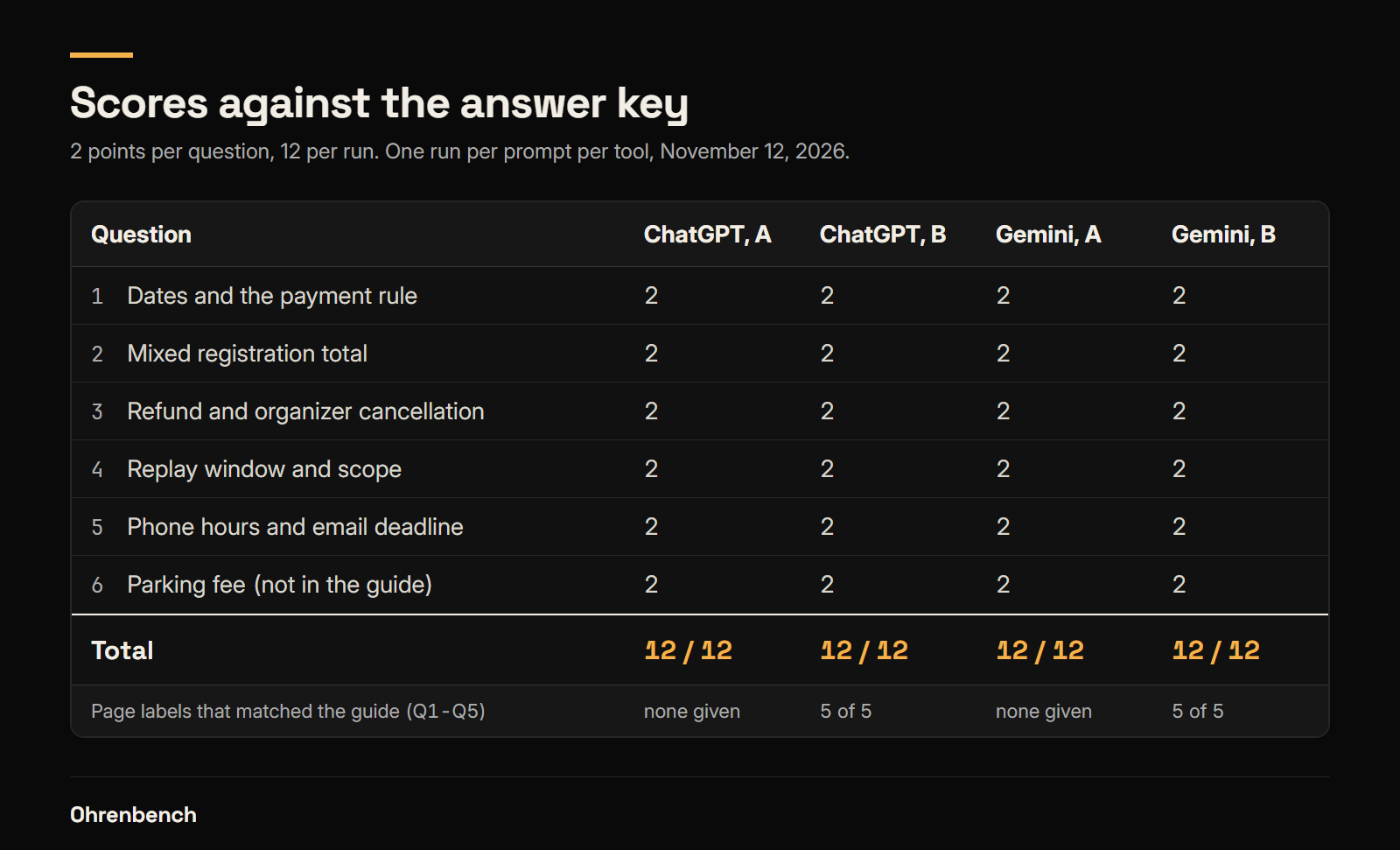
On the 0-to-2 scale per question that we set in advance, all four answers scored 12 out of 12. The score covers the six answers only. It is not an accuracy rate for either product, and one run per prompt cannot rank them.
Three people, but not a group
The general fee is $90 and the student fee is $60. Paying by 6:00 p.m. on November 10 takes 10% off the general fee. The group discount needs three or more general attendees, and students are not counted.
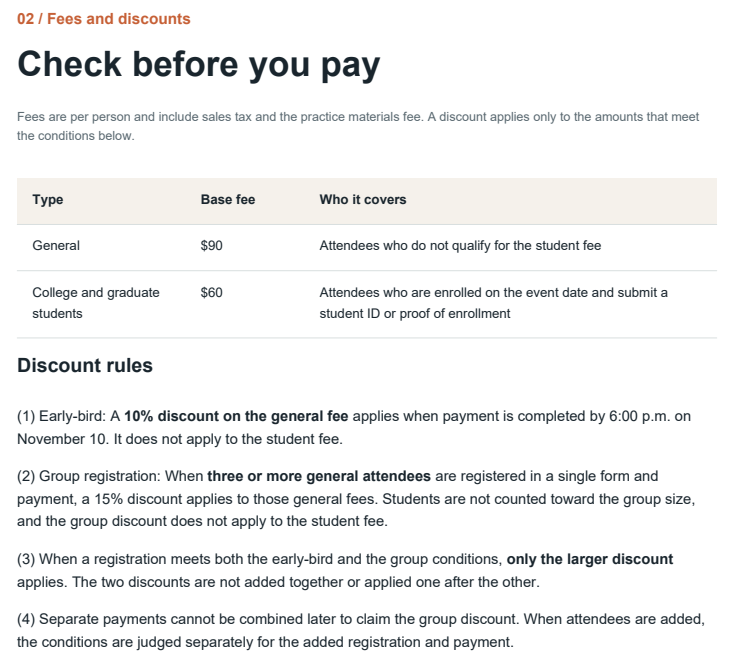
The question had two general attendees and one student with proof of enrollment paying together at 5:00 p.m. on November 10. All four answers kept the two fee types apart.
$90 × 0.9 × 2 + $60 = $222
The refund question worked the same way. Refunds are based on the amount actually paid, not the list price, so an attendee who paid $81 and cancels inside the 50% window gets $81 × 0.5 = $40.50. All four answers also caught the exception: if the organizers cancel the event, the full amount paid is refunded no matter when.
The prompt B answers were longer and showed more of the arithmetic. The prompt A answers gave the same rules and the same amounts, so this test cannot say that B is the more accurate prompt.
Three checks before you use a summary
First, page references came only when we asked. With prompt A, ChatGPT named the guide once at the top and gave no page or section. Gemini put a small chip with the PDF’s file name after most lines under both prompts, and a file name does not tell you where to look. We did not open the chips, so what they show when opened is outside this test. With prompt B, both chatbots named a page and a section for each of the five questions the guide can answer, and all ten labels matched the page where the rule sits. The amounts and the rules were the same under both prompts. What the prompt B answers added was a page and a section to check for each one.
Second, some figures in the answers are not printed in the guide. Gemini’s prompt A summary said a student who misses the proof deadline pays “the $30 difference.” In the guide, the rule is only that the difference from the general fee must be paid; $30 is the chatbot’s own subtraction of $60 from $90. ChatGPT gave calling windows of 10:00 a.m. to noon and 1:00 to 5:00 p.m., which is the business hours with the lunch closure taken out. Gemini’s prompt A answer put “Sunday” in front of both replay dates. Each of these is correct. Each is also a derived value, and a derived value is where an error would enter in a document with one more exception. When a number in a summary does not appear in the source, redo the arithmetic yourself.
Third, “not in the document” needs a whole-document check. All four answers said the guide gives no parking fee. A page reference cannot prove an absence. With prompt B, ChatGPT pointed to the venue line on page 1 and added that no fee appears anywhere on pages 1 to 4, and Gemini cited the entire document. We confirmed it by searching the PDF text for “parking,” which returns nothing. A missing fee also does not mean parking is free, or that there is no parking.
One more detail matters if you paste an answer somewhere else. In ChatGPT’s prompt A answer, the list of what the replay includes was marked only with colored icons. In the text we saved from the page, the five items had no yes or no beside them, and only the sentence after the list carried the answer. Read a pasted answer once more before you send it on.
A checking order for your own PDF
After you get a summary, check three groups of things against the source.
- Numbers and units: amounts, head counts, dates, times and the time zone. For discounts and refunds, check which amount the percentage was applied to, not just the result.
- Conditions and exceptions: who a rule applies to, until when, and what falls outside the general rule. Read the notes under tables too.
- Sources and missing information: ask for the page or section, then open that page and read the sentence. For anything reported as not in the document, search the whole file, and do not fill the gap with what is usual elsewhere.
In this test, the plain prompt and the detailed prompt both handled the math and the exceptions. What the detailed prompt added was a page and a section beside each answer, and for questions 1 to 5 those locations matched the guide. Use both habits: ask for pages and arithmetic up front, and still compare the answer with the source.
This is a record of two chatbots, one account each, one made-up document and one run per prompt. The PDF was four pages of selectable text. Scans, handwriting, long contracts and multi-column layouts were not tested, and the result does not speak for another model, account, document or day, or for the overall accuracy of either service.
Leave a Reply