OpenAI’s Agent Builder is scheduled to shut down on November 30, 2026. If you built workflows by connecting nodes on its canvas, you need to export them as code and decide where they will run before then. Reusable prompts (v1/prompts) and the Evals platform are scheduled to shut down on the same day. OpenAI deprecations page
Three things to do today. Find your workflows and any wf_ or pmpt_ IDs in your code, save what the original workflow returns, and copy the code from Code → Agents SDK.

This post is an explainer based on OpenAI’s official documentation as checked on November 6, 2026. It is not a hands-on report: we did not export or migrate a workflow in a real account. It covers what to check now and how to choose where to move.
What shuts down on November 30, 2026
On June 3, 2026, OpenAI announced the deprecation of all three products together. Existing users can keep using Agent Builder during the transition window, and ChatKit remains available. Agent Builder docs
| What | Official timeline | Where OpenAI points you |
|---|---|---|
| Agent Builder | Scheduled to shut down November 30 | Agents SDK or ChatGPT Workspace Agents |
Reusable prompts (v1/prompts) |
Scheduled to shut down November 30 | Move the prompt content into your application code |
| Evals dashboard and API | Existing evals read-only from October 31; scheduled to shut down November 30 | Promptfoo |
| ChatKit | Remains available | For new work, an integration that runs on your own server |
The docs give a date but no time of day and no time zone. Don’t plan on having all of November 30 in your own time zone. Finishing a few days early is the safer choice.
Are you affected? Four things to look for
Search your code and your dashboard for the four items below. The ID prefixes are the ones used in the examples in OpenAI’s docs.
- A workflow you built in Agent Builder. Even if it was never connected to an app, export it if it holds anything you want to keep.
- An ID that starts with
wf_in your code. This is the workflow ID you pass in when you set up a ChatKit session. It marks a hosted integration that depends on Agent Builder. - An ID that starts with
pmpt_in your code. This is a reusable prompt passed asprompttoresponses.create. - Evals you ran from the Evals dashboard or API. On the official timeline, existing evals became read-only on October 31, so the time left is for copying things out.
What to save before the shutdown
The steps below are Ohrenbench’s suggestions, not an official procedure. Do them before you pick a destination and they will be useful whichever way you go.
- Make an inventory. Put workflow names and IDs, published versions, connected tools, the places in your code that use
pmpt_andwf_, and an owner for each into one table. - Save baseline results. Run the current workflow on 10 to 20 real inputs and record the final answer, the order of tool calls, and what happens when something fails. After the shutdown it will be hard to run the original again for comparison.
- Commit the exported code to your repository. Write down the export date and the published version next to it, so you can trace what changed later.
- Copy out your prompts and evals. Keep the prompt text and model, and the test data and grading criteria, in a place you control. The migration guide we checked does not describe a way to move past Evals run results, so look up any results you need before the dashboard closes.
How to export an Agent Builder workflow
The export steps in the official migration guide are short.
- Open your workflow in Agent Builder.
- Select Code in the top navigation.
- Select Agents SDK in the code dialog.
- Select TypeScript or Python, then copy the complete export.
The same guide states that this process does not convert your workflow graph or guarantee that every behavior transfers unchanged. Exported code that runs is not proof that it behaves like the original workflow. Review control flow, triggers, tools, and permissions again. Migrate from Agent Builder
Agents SDK or Workspace Agents: which migration path?
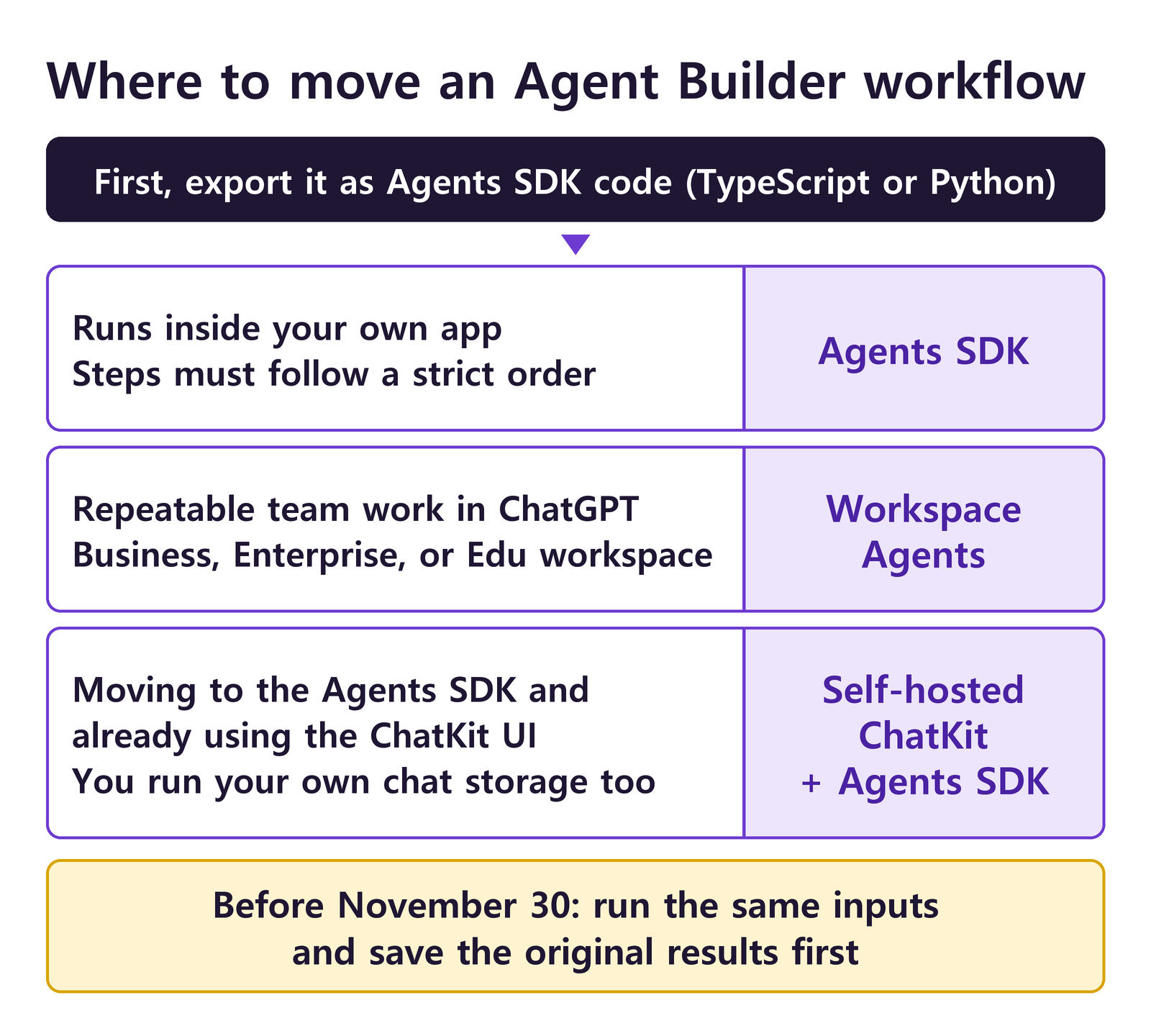
The official guide offers two paths.
| Compare | Agents SDK | ChatGPT Workspace Agents |
|---|---|---|
| How you build | Code | Natural language in ChatGPT |
| Where it runs | An application you build and deploy | A ChatGPT workspace |
| What you need | Your own checks on runtime configuration, tools, authentication, permissions, and deployment | A ChatGPT Business, Enterprise, or Edu workspace with access to workspace agents and permission to create agents |
| Good fit | A feature that runs inside your app | Repeatable work that a team shares |
| Watch out for | Validating the behavior and running it in production become your job | Work whose branching and step order must stay fixed may not carry over faithfully |
Here is how to choose. This is Ohrenbench’s suggestion based on the conditions above, not an official ruling.
- A workflow that branches in a fixed order and returns its result to your service is safer on the Agents SDK. The official guide lists the limitation for this kind of work on the Workspace Agents side.
- If you don’t have a Business, Enterprise, or Edu workspace, you don’t meet the requirement the guide states, so of its two paths, yours is the Agents SDK.
- Work a team repeats on a regular basis, such as preparing for meetings, is worth trying in Workspace Agents first. The official cookbook walks through using connected apps, running on a schedule, and sharing with colleagues. Workspace Agents cookbook
If you move to the Agents SDK
Copy the exported code into your application, install the matching SDK, and run it. The official guidance is to validate your application’s configuration and behavior before you deploy it. Agents SDK quickstart
# Python
pip install openai-agents

# JavaScript / TypeScript
npm install @openai/agents zod
The Python repository’s README describes the SDK as provider-agnostic: it supports other LLMs as well as the OpenAI APIs. The code lives in two repositories, Python and JavaScript/TypeScript, and both use the MIT license. The docs also list an Agents API, where OpenAI runs the agent for you, but that is not the path the Agent Builder migration guide picks. Agent runtime options compared
If you move to Workspace Agents
Create a workspace agent in ChatGPT, then paste your exported code into the chat. The official guide gives this prompt.
Please help me convert this workflow into an agent:
<paste your exported code here>
Next, review any behavior the builder flags as needing changes, and configure the apps, tools, skills, authentication, and connection permissions the agent needs. The guide’s order is to select Preview, test representative inputs from the original workflow, compare the results, and select Create only after that. Connected apps, authentication, publishing, and permission settings need a separate review in ChatGPT.
Two things to know before you start. The official cookbook, dated April 22, 2026, introduces Workspace Agents as a research preview. Check the current availability and pricing for your own workspace before you move. There is also documentation for a trigger API that lets an outside system start a published agent.
If your app uses ChatKit
ChatKit itself stays. What changes is the hosted setup, where ChatKit calls an Agent Builder workflow published on OpenAI. The docs say you can keep using that hosted workflow during the transition window, and they point new apps and migrations to an integration with your own server. They do not say how hosted sessions behave after November 30. Don’t assume they keep running. Switching the integration before then is the safer choice. ChatKit docs
With your own server, the server streams results back to the client, and a helper connects that server to the Agents SDK. The starting point is the Python package openai-chatkit. You override respond on ChatKitServer and use the stream_agent_response helper. Advanced integrations with ChatKit
Storage becomes your job too. You implement a Store that persists threads, messages, and files in your own database, and a FileStore if you support uploads. We did not find a feature for moving existing hosted conversations in the docs we checked. If chat history matters to you, confirm that first. On the frontend, point apiURL at your server and add any authentication you need through the fetch option. User identity and permissions reach your stores through the context you pass to server.process.
Working examples are on GitHub. openai-chatkit-advanced-samples is a set of demos that pair a FastAPI backend with a React frontend, and openai-chatkit-starter-app holds both a self-hosted starter app and a hosted one. The libraries are chatkit-js and chatkit-python.
Reusable prompts move into your code
v1/prompts and reusable prompt objects are also scheduled to shut down on November 30. The content you saved in the dashboard has to move into your application code. Trimmed down, the official before-and-after example looks like this.
// Before: call a stored prompt object by its ID
const response = await client.responses.create({
  prompt: {
    id: "pmpt_123",
    version: "1",
    variables: { customer_name: "Acme", issue: "billing question" },
  },
});

// After: write the prompt directly in your code
const response = await client.responses.create({
  model: "gpt-6-astra",
  input: [
    { role: "system", content: "You are a helpful support assistant. Be concise, accurate, and friendly." },
    { role: "user", content: "Customer name: Acme. Issue: billing question. Write a response to the customer." },
  ],
});
The “after” example includes a model that the “before” call did not have. We read that as a sign that if your prompt object also stored the model, you now have to write it in code yourself. The guide advises against scattering prompts across the codebase. It recommends a small prompts/ module that keeps each prompt as a named function, so prompt changes go through PRs and tests like the rest of your code. Migrate from prompt objects
OpenAI Evals: rebuild your evals in Promptfoo
The migration path OpenAI points to is the open-source Promptfoo (MIT). The official docs state that Promptfoo is part of OpenAI. The migration guide, though, does not rely on an Evals export feature. It covers recreating your prompts, provider, test cases, and assertions by hand in a promptfooconfig.yaml file. That means you need to copy out your test data and grading criteria before the dashboard closes. Moving from OpenAI Evals to Promptfoo
promptfoo eval -c promptfooconfig.yaml --no-cache
promptfoo view
A new run is separate from your earlier Evals runs. The same guide adds that similarity-based scoring may not produce identical numbers across systems. Validate any grader you recreate, especially an LLM-as-a-judge grader, before you use it to decide whether quality got worse. To try the getting-started example you need Node.js 22.22.0 or newer, and running an eval makes model calls that incur API charges. Get started with Promptfoo
Research gives a reason not to trust a grader right away. The paper Who Validates the Validators? argues that LLM-generated evaluators inherit the problems of the LLMs they evaluate, so they need further human validation. In its study of nine industry practitioners, grading outputs also led participants to change their criteria along the way, which the paper calls criteria drift. It is a small qualitative study, and it is not about Promptfoo or this migration. One step still carries over: have a person grade a sample of real outputs first, then compare those grades with the automated ones.
What to check after you migrate
These are also Ohrenbench’s suggestions, not an official procedure.
- Compare on the same inputs. Before you ask whether the answer sounds right, check whether branching, the order of tool calls, approvals, and failure handling match.
- Check the model names in your code. On the OpenAI deprecations page,
gpt-5ando3are listed for removal from the API on December 11, 2026, and GPT-4 series snapshots such asgpt-4o-2024-08-06on January 14, 2027. You can also read shutdown dates from theshutdown_datefield of the List models endpoint. - Cut over last. Move traffic to the new path, confirm the results, and only then drop the dependency on the old workflow. Finish a few days early so you can still switch back if something goes wrong.
Further reading
- OpenAI deprecations page: the full timeline and recommended replacements
- Migrate from Agent Builder: export steps and limitations
- Agents SDK overview: agent runtime options compared
- Agents SDK Python docs: tools, handoffs, tracing
- Moving from OpenAI Evals to Promptfoo: how to recreate an eval
- Who Validates the Validators?: why LLM graders need human validation
A tool saying it will move your work is one thing. Your work running the same way afterward is another. Save baseline results now, and you will be able to spot what changed whichever path you take.
Leave a Reply