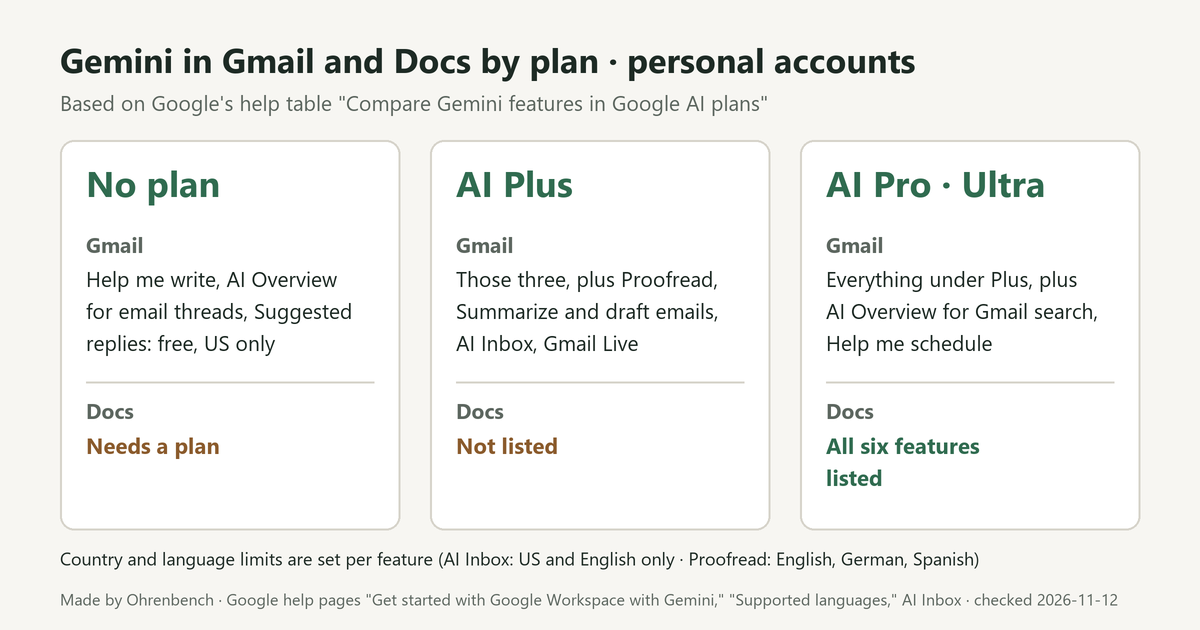
This post is for anyone who wants to use Gemini inside Gmail or Google Docs with a personal Google Account. The short answer: chatting in the Gemini app and using Gemini inside Gmail and Docs have different requirements. For the features inside Gmail and Docs, a personal account needs Google AI Plus, Pro or Ultra. Without a plan, three Gmail features are free, and only in the US. In Google’s plan comparison table, Google AI Plus is listed for seven of the nine Gmail features, and every Docs feature is listed under Pro and Ultra only. Some features also carry country and language limits that a plan doesn’t remove.
We read Google’s help pages Get started with Google Workspace with Gemini and Supported languages for Google Workspace with Gemini, the help pages for individual features, and the US edition of the Gemini subscriptions page on November 12, 2026. This post doesn’t cover prices or usage-limit numbers. Work and school accounts get these features through a Google Workspace plan, so the tables below don’t apply to them.
The Gemini app and Gemini in Gmail and Docs are not the same thing
- The Gemini app is part of the Free tier. The subscriptions page lists “Gemini app” in its Free column.
- Gemini inside Gmail, Docs, Drive and other Google apps works differently. With a personal Google Account, access comes with Google AI Plus, Google AI Pro or Google AI Ultra.
- With no plan, a personal account in the US can use three Gmail features at no charge: Help me write, AI Overviews for email threads and Suggested Replies. The Help me write page describes personal accounts this way: “Available in supported languages, but restricted to the US only.”
- You have to be 18 or over to use Gemini in Gmail and Docs.
Gemini in Gmail and Docs by plan: Free, Google AI Plus, Pro and Ultra
The rows below are the Gmail and Docs rows of Google’s table “Compare Gemini features in Google AI plans.” That section says “Availability of Gemini features varies depending on your Google AI plan” and names the plans next to each feature. “Listed” means the plan’s name appears next to the feature, and “Not listed” means it doesn’t. The table below doesn’t cover Google Workspace Experiments, a trusted tester program that lets enrolled personal accounts try some new AI features.
| App | Feature | Personal account, no plan | AI Plus | AI Pro · AI Ultra |
|---|---|---|---|---|
| Gmail | Help me write, AI Overview for email threads, Suggested replies | Free, US only | Listed | Listed |
| Gmail | Proofread, Summarize and draft emails, AI Inbox, Gmail Live | Needs a plan | Listed | Listed |
| Gmail | AI Overview for Gmail search, Help me schedule | Needs a plan | Not listed | Listed |
| Docs | Help me write, Write and edit, Summarize a document, Create personalized documents, Generate an image, Audio generation | Needs a plan | Not listed | Listed |
Drive, Sheets, Slides and Forms follow the Docs pattern: each of their rows lists Pro and Ultra only. The subscriptions page points the same way. Its Google AI Plus column says “Gemini in Gmail, Vids, and more,” and its Google AI Pro column says “Gemini in Gmail, Docs, Vids, and more.”
Google’s own pages disagree on AI Overview for Gmail search. The comparison table lists it under Pro and Ultra, while that feature’s help page names Google AI Plus, Pro and Ultra for personal accounts. If that feature is your reason to subscribe, read both pages again before you pick a plan.
A plan doesn’t remove country limits
The comparison table has no country column. The limits sit on each feature’s own help page.
- AI Inbox is listed for Plus, Pro and Ultra, but its help page says: “This feature is only available in the US and in English.” Google also labels it a beta.
- AI Overview for Gmail search is not available for personal accounts if you live in the European Economic Area or its overseas countries and territories, Japan, Switzerland or the United Kingdom. Its help page adds that the feature “is gradually rolling out to Gmail and may not be available to you yet.”
- Help me write in Gmail goes the other way. With an eligible Google AI plan it is “Available in multiple supported languages globally.”
A plan name in the table doesn’t mean the feature is open where you live. Once you know which feature you want, open its help page and look for a country line.
Supported languages differ by feature
The supported languages page keeps a separate list for each feature. For Gmail and Docs, the lists look like this.
| App | Feature | Languages listed |
|---|---|---|
| Gmail | Help me write, AI Overview conversation summaries, AI Overview in Gmail search | English, French, German, Italian, Japanese, Korean, Portuguese, Spanish |
| Gmail | Proofread | English, German, Spanish |
| Gmail | Gemini in Gmail side panel | 29 languages |
| Docs | Help me write | English, French, German, Italian, Japanese, Portuguese, Spanish |
| Docs | Help me create | English, French, German, Italian, Japanese, Korean, Portuguese, Spanish |
| Docs | Generate an image, Gemini in Docs side panel | 29 languages |
Proofread has the shortest list. It is listed for Google AI Plus, yet its list has only English, German and Spanish. Help me write also differs between apps: the Gmail list has eight languages and the Docs list has seven, without Korean. If a feature isn’t offered in your language, the getting-started page says “you can switch to a supported language in your Google Account.”
What to check before you subscribe
- Make sure the account is a personal Google Account that you manage on your own. For a work or school account, look at your Google Workspace plan instead.
- Make sure you are 18 or over.
- Decide which feature you want and whether it lives in Gmail or Docs, then find its row in the comparison table. Docs features are listed under Pro and Ultra only.
- Open that feature’s help page and look for a country limit such as “only available in the US.”
- If you write in a language other than English, find the feature in the supported languages list.
- Keep in mind that usage limits apply to Google AI plans.
Sources and further reading
- Get started with Google Workspace with Gemini: account requirements and the plan comparison table
- Supported languages for Google Workspace with Gemini: the language list for each feature
- Draft emails with Gemini in Gmail: Help me write with and without a plan
- Manage to-dos & topics with AI Inbox, Get an AI Overview in Gmail search, Proofread your drafts with Gemini in Gmail: plan, country and language requirements for those three features
- Gemini subscriptions (US edition): what each plan column lists
The plan name alone won’t settle it. Pick the one feature you want, then check plan, country and language in that order.
Leave a Reply