On November 12, 2026, we pasted the same made-up meeting memo into the web versions of ChatGPT and Gemini and asked for meeting notes two ways: a one-sentence request and a detailed one. That gave four answers. All four carried over every owner, the revised deadline, and the owner and the deadline the meeting left open.

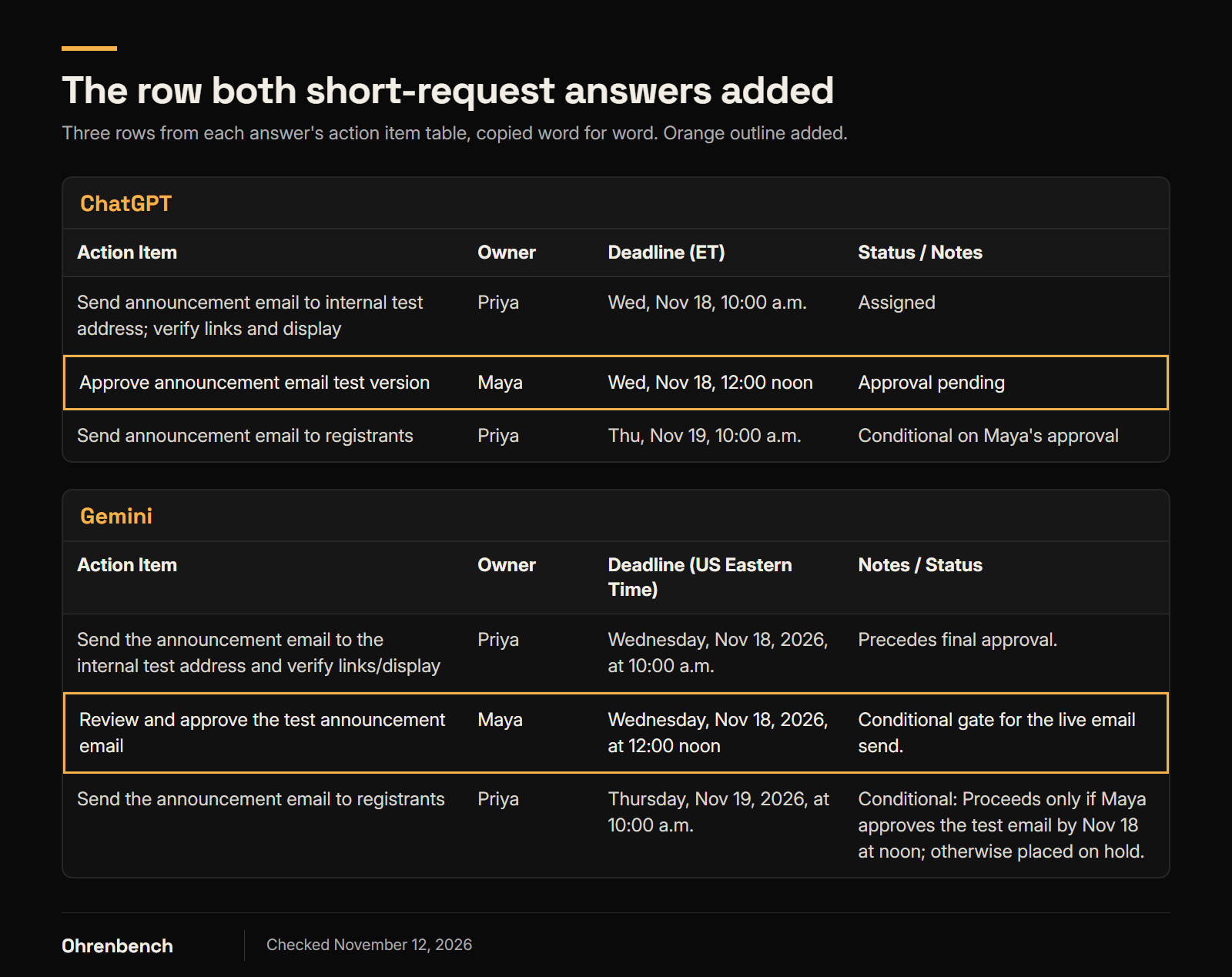
Both answers to the short request changed one thing, though. The meeting set a condition: if Maya approves the test email by Wednesday at 12:00 noon, Priya sends it. Both action item tables turned that into a separate task for Maya, due Wednesday at noon.
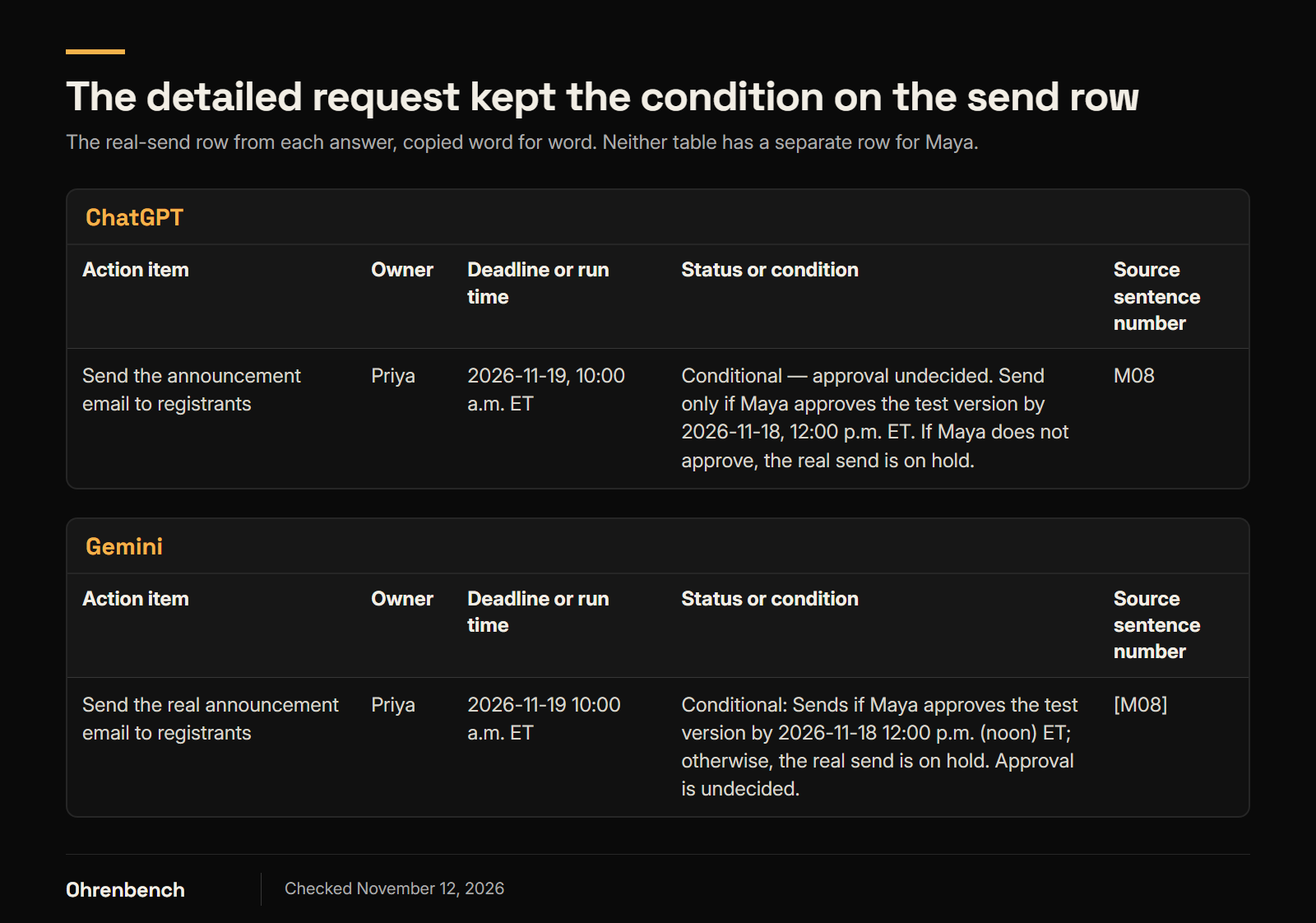
With the detailed request, neither tool added that task. The approval stayed what it was in the memo: a condition on Priya’s send.
Below: what the four answers kept, what changed, and what to check before AI meeting notes go into a task list. Test rerun: November 12, 2026, in English. This post first went up on November 5 with an earlier run from November 2. Compared with that run, the memo and both requests were written anew in English, the screen language changed from Korean to English, and Gemini’s model on screen changed from 3.1 Pro to 3.8 Flash, while the two tools and the count of four answers stayed the same, so the two runs are not a like-for-like comparison.
What the four answers kept, and what changed
The test used a made-up memo about preparing a small online workshop, not real company notes. The people, the project, and the schedule are fictional. Before any run, we fixed an answer key: two decisions, six action items, and one proposal the meeting did not decide on. Each answer was then checked against that key.
The short request was one sentence: "Briefly summarize the meeting memo below, and put the action items, owners, and deadlines in a table." The detailed request added rules: write "TBD" for anything undecided, keep conditions and proposals apart from confirmed tasks, use the final schedule, and add the source sentence number. Both requests and the memo are printed in full further down.
| Tool and request | What this answer kept | What to check against the memo |
|---|---|---|
| ChatGPT · short request | The revised deadline, the unassigned owner, the missing deadline, the no-redesign decision, the link and display check, and the hold if the email is not approved | Added "Approve announcement email test version" as a task for Maya, due Wed, Nov 18, 12:00 noon |
| Gemini · short request | The revised deadline, the unassigned owner, the missing deadline, the no-redesign decision, the link and display check, and the hold if the email is not approved | Added "Review and approve the test announcement email" as a task for Maya, due Wednesday, Nov 18, 2026, at 12:00 noon |
| ChatGPT · detailed request | Confirmed tasks, the conditional send, and the undecided proposal in separate places, each with its source sentence number | Nothing missing or added against the answer key |
| Gemini · detailed request | Confirmed tasks, the conditional send, and the undecided proposal in separate places, each with its source sentence number | Nothing missing or added against the answer key |
Each row is a single answer. Against the answer key, all four answers identified the six action items, matched each one to the right owner or marked it unassigned, and kept every date and time. None of the nine items in the key (two decisions, six action items, one proposal) needed a fix. The count that differed was added tasks: one in each short-request answer, none in the detailed-request answers. "Nothing missing or added" applies to this memo and this answer key only.
"If Maya approves, Priya sends" is not "Maya approves by noon"
Sentence M08 of the memo:
If Maya approves the test version by Wednesday (Nov 18) at 12:00 noon, Priya will send it to registrants on Thursday (Nov 19) at 10:00 a.m. If Maya does not approve it, the real send is on hold. Whether it will be approved is not decided yet.
What is settled here is the condition on Priya’s send. If Maya approves by noon on Wednesday, the email goes out on Thursday. If Maya doesn’t, it waits. The meeting did not commit Maya to reviewing or deciding by noon.
Both short-request answers put a separate row in the action item table anyway. ChatGPT’s row: Approve announcement email test version / Maya / Wed, Nov 18, 12:00 noon / Approval pending. Gemini’s row: Review and approve the test announcement email / Maya / Wednesday, Nov 18, 2026, at 12:00 noon / Conditional gate for the live email send. Neither tool invented a person or a date. Each took the approver and the cutoff time from the memo and rewrote the condition as a task with a due time. Gemini’s note calls the row a gate for the send, but the row still sits among the tasks with an owner and a deadline.
In real work, someone may still want to ask Maya for a review. That is a suggestion to raise after the meeting, separate from what the meeting decided. Inside an action item table, it reads like a job someone already agreed to do.
Both answers also kept the original condition. ChatGPT wrote, under "Outstanding Issues," "Otherwise, the real send is on hold." Gemini wrote in its send row: "Proceeds only if Maya approves the test email by Nov 18 at noon; otherwise placed on hold." So the rule from the memo survived, and the extra task was added on top of it.
The detailed request kept the condition on the send
With the detailed request, both tools wrote six action items and no row for Maya. The approval went into the status cell of Priya’s send row, together with the cutoff time, the hold rule, and the fact that approval is still undecided.
The task details held up too. In sentence M04, Priya checks two things in the internal test email: that the links work and that the email displays correctly. All four answers kept both, from ChatGPT’s "verify links and display" to Gemini’s "check that links work and the email displays correctly."
That part went differently in the earlier run. On November 2, with a Korean-language memo, Gemini’s detailed-request answer put the right sentence number next to the email test and still left out the link check. A source number points to where to look in the memo. It does not confirm that everything in that sentence made it into the row.
One note in this run is worth a second look as well. In its short-request table, Gemini added the note "Will use the existing page template." to Leo’s form check. In the memo, the template decision belongs to the sign-up page (M01) and is not part of Leo’s task (M03). We did not count this as an error, because no person, date, or task was added.
How the test was run
Test date: November 12, 2026, Korea Standard Time (KST). We used one made-up memo. For each tool, the short request and the detailed request each went into a new temporary chat, once. We compared the four first answers, with no regenerating and no follow-up prompts.
| Item | ChatGPT | Gemini |
|---|---|---|
| Model shown on screen | GPT-6 | 3.8 Flash (mode button: "Flash") |
| Thinking setting shown | Thinking effort: Medium | Thinking level: Low |
| Plan label on the page | None found | "Pro" |
| Chat type | New temporary chat | New temporary chat |
| Screen language | English, set through the page address | English, set through the page address |
| Personalization | No settings opened or changed | No settings opened or changed |
The model and setting names are the ones the screen displayed. Which model actually produced each answer was not verified. The model names and Gemini’s thinking level were read from each tool’s model picker right after the four runs; during the runs, the picker buttons displayed "Thinking effort Medium" and "Flash." The model names and settings shown on screen differed between the two tools, so this is not a like-for-like model comparison or a comparison of free plans. There was one memo and one answer per request, so the test does not cover how much answers vary when the same input is run again.
The detailed request was written with this memo’s weak spots in mind: the schedule change, the undecided owner and deadline, the approval condition, and the proposal. The difference seen here does not establish that the same request has the same effect on every meeting memo.
Each answer was graded once against the answer key. There was no second, independent grader.
The earlier run on November 2 used the same design with a Korean-language memo. There, too, both short-request answers added a task for the approver, and neither detailed-request answer did. Gemini’s answers in that run also left out three details that this run kept: the no-redesign decision and the hold rule in the short-request answer, and the link check in the detailed-request answer. The two runs differ in language, date, and the Gemini model on screen (3.1 Pro on November 2), so the cause of that difference is unknown.
The two requests, ready to copy
Paste one of the requests below, add a blank line, then paste the full memo from the next section. That is the exact input used in this test. A "prompt" is just the request you type to the AI tool.
Short request
Briefly summarize the meeting memo below, and put the action items, owners, and deadlines in a table.
Detailed request
Organize the meeting memo below. Use only what is written in the memo, and do not guess any owner, deadline, or approval status that is not there.

Output format:
1. Briefly summarize the decisions that were confirmed.
2. Put the confirmed action items and the conditional action items in a table. Use these columns: Action item / Owner / Deadline or run time / Status or condition / Source sentence number.
3. List proposals that are not confirmed yet separately from the action items.

Rules:
- If an owner or a deadline was not decided, write "TBD".
- If a task's schedule was changed, use the final confirmed schedule, and do not create a duplicate action item from the canceled one.
- Write dates as YYYY-MM-DD with times in US Eastern Time (ET). The meeting date is Thursday, November 12, 2026.
- For a conditional task, write the condition and the hold rule together, and if the approval is still undecided, keep it that way.
- Do not turn the person who made a proposal into an owner, and do not turn a proposal into a confirmed action item.
- Add the matching source sentence number to each decision, action item, and proposal.
For your own memo, change the meeting date and the time zone. To get source sentence numbers back, number the sentences in your memo first, as in the example below.
The full made-up memo used in the test
This is a fictional memo written for an AI meeting-notes test. The people, the project, and the schedule are made up and are not a record of any real organization.

Meeting: Online mini-workshop prep
Meeting date: Thursday, November 12, 2026. All times are US Eastern Time (ET).
Attendees: Maya (chair), Dana, Leo, Priya, Owen

[M01] The sign-up page for this workshop will use the existing template. A full redesign is out of scope for this round.
[M02] Dana will write the first draft of the sign-up page copy. The first plan was to have it by tomorrow, Friday (Nov 13), at 5:00 p.m.
[M03] Leo will check that the sign-up form works on both desktop and mobile, write up any bugs he finds, and share the list by Tuesday (Nov 17) at 3:00 p.m.
[M04] Priya will send the announcement email to the internal test address and check that the links work and the email displays correctly. She will finish by Wednesday (Nov 18) at 10:00 a.m.
[M05] Schedule change during the meeting: Dana needs more material for the copy draft, so its deadline moves to Monday (Nov 16) at 5:00 p.m. The Nov 13 deadline mentioned earlier is canceled.
[M06] A cost comparison of the workshop hosting tools is needed by Tuesday (Nov 17) at 5:00 p.m. Nobody has been assigned to write it yet.
[M07] Owen will clean up the folder of materials from the last workshop. No deadline was set for this in the meeting.
[M08] Priya's real send of the announcement email is conditional. If Maya approves the test version by Wednesday (Nov 18) at 12:00 noon, Priya will send it to registrants on Thursday (Nov 19) at 10:00 a.m. If Maya does not approve it, the real send is on hold. Whether it will be approved is not decided yet.
[M09] Dana suggested also making a 30-second promo video. The group did not decide whether to make it, and no owner or schedule was set.

End of meeting. There is no other information about owners, schedules, or approvals beyond what is written above.
This run supports one review step above the others: look for rows that turn a condition into a confirmed task. Two more steps come from the answer key and from the earlier run, where they caught misses: check that the details inside each task are still there, and check that decisions about what not to do are still there. All four answers passed those two this time.
Treat an AI-made table as a starting point for checking the memo. After the owners and dates, trace each row’s task and its condition back to the sentence it came from.
Leave a Reply