If your code or an automation tool calls the OpenAI image API, check which model name it sends. OpenAI’s deprecations page lists December 1, 2026 as the shutdown date for three older GPT Image models: gpt-image-1-mini, gpt-image-1.5 (along with its dated snapshot gpt-image-1.5-2025-12-16) and chatgpt-image-latest. The recommended replacement for all three is gpt-image-2.6-sunburst or gpt-image-2.6-flare.
Nothing on that page says image creation in the ChatGPT app is ending. The dates apply when you call one of these models by name through the API.
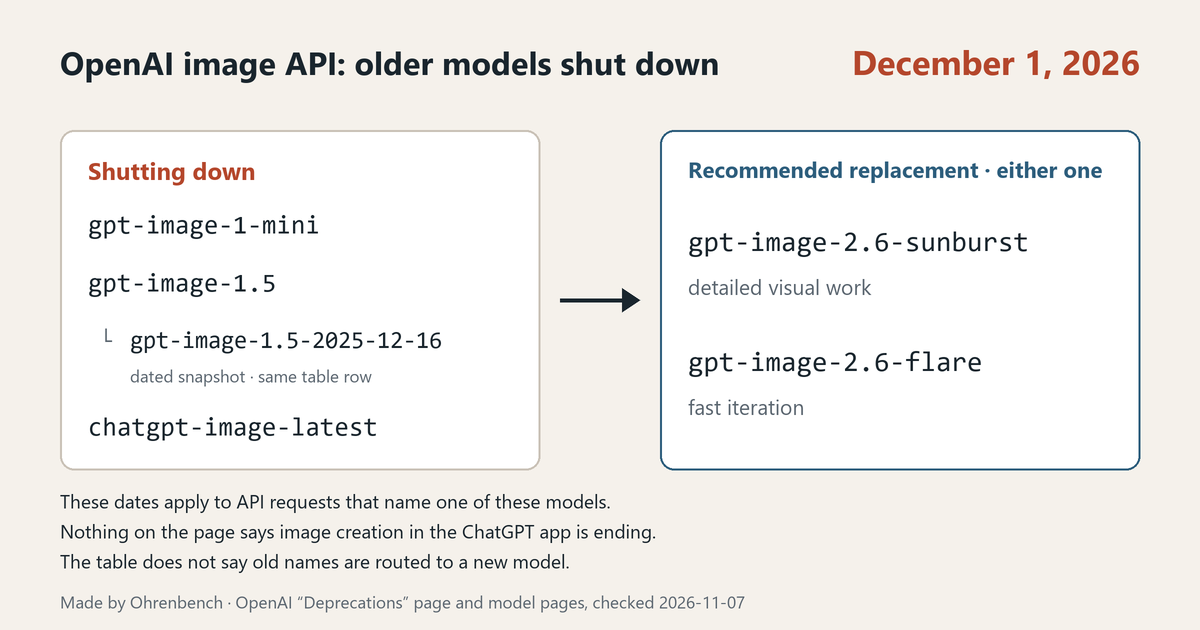
Which models shut down and what replaces them
| Shutdown date | Model name | Recommended replacement |
|---|---|---|
| December 1, 2026 | gpt-image-1-mini |
gpt-image-2.6-sunburst or gpt-image-2.6-flare |
| December 1, 2026 | gpt-image-1.5, gpt-image-1.5-2025-12-16 |
gpt-image-2.6-sunburst or gpt-image-2.6-flare |
| December 1, 2026 | chatgpt-image-latest |
gpt-image-2.6-sunburst or gpt-image-2.6-flare |
OpenAI notified developers using these models on June 2, 2026.
- The alias
gpt-image-1.5and its dated snapshotgpt-image-1.5-2025-12-16share one row of the table. Whichever one is in your code, it is on the list. chatgpt-image-latestis an API model name. Its model page says it “points to the Image snapshot previously used in ChatGPT.” The name has chatgpt in it, but it is a name you call through the API.gpt-image-1is not in this table. A separate table on the same page, announced April 22, 2026, lists it among the models shut down on October 23, 2026.
Shutdown means the model is no longer accessible
The deprecations page defines the term: at the time of the shutdown, the model or endpoint will no longer be accessible. The December 1 table gives a recommended replacement for each name. It does not say requests to an old name will be routed to a new model.
Sunburst vs. Flare: how the two gpt-image-2.6 models differ
Here is how each model page describes its model.
gpt-image-2.6-sunburst: image generation and editing for detailed visual work. Use it for detailed compositions and image editing workflows.gpt-image-2.6-flare: image generation and editing for fast iteration. Use it for interactive image generation and editing workflows.
Both model pages show “Not specified” for performance and speed, so these two pages do not give figures for comparing quality or speed. The practical way to choose is to send your own prompts to each model and compare what comes back.
One mismatch to know about: the model page for chatgpt-image-latest says “We recommend GPT-Image-2.5 Sunburst for API use,” while the deprecations page recommends 2.6 Sunburst or Flare. This post follows the deprecations table. The image generation guide also introduces the two 2.6 models and then notes that its existing examples use GPT Image 2.5, so check the model name when you copy an example.
Where to change the model name
The image generation guide explains where the model name goes in each API. The names it uses there are the two 2.5 models, gpt-image-2.5-sunburst and gpt-image-2.5-flare.
- Image API: set
modelto the image model name directly. - Responses API: the top-level
modelis a supported mainline model, and the image model name goes in the image generation tool’smodelfield.
So if you generate images through the Responses API, the name to look at is the one inside the tool settings, not the top-level model. Keep in mind that the same guide describes the new 2.6 features for the Image API and gives no example of a 2.6 name in the Responses API tool field. If you plan to move to 2.6 on the Responses API, check the Endpoints section of the 2.6 model pages first.
New in 2.6: the complexity setting
Both 2.6 models support complexity control, markup-guided edits, SVG output and animated GIF output through the Image API.
complexitycontrols how much the model plans before rendering. The levels arelow,mediumandhigh. If you leave it out, both models usehigh.- Lower complexity can suit focused edits, such as changing a background or a sign, and higher complexity can help with dense text and complex layouts.
- Higher complexity can also increase latency and introduce unwanted changes, so compare results for your task. Rendering quality is controlled separately by
quality, and adjusting complexity has no separate fee.
The deprecations page does not say whether the settings you used with the old models carry over to 2.6. The guide names quality, size, format and compression as the settings you can adjust. Send one request to the new name with the values you use today and check the result.
If an automation tool makes the call for you
No-code automation tools and third-party services sometimes call OpenAI image models on your behalf. Start by finding out whether you choose the model name in a setting or the service chooses it. If you choose it, change the name in that setting. If the service chooses it, ask whether it plans to switch before December 1.
Five things to check before December 1
- Find the image model name in your code and automation settings. See whether it is one of the four in the table:
gpt-image-1-mini,gpt-image-1.5,gpt-image-1.5-2025-12-16orchatgpt-image-latest. - If you use the Responses API, look at the
modelfield inside the image generation tool (that is where the guide’s 2.5 examples put the name). Check the 2.6 model pages before you put a 2.6 name there. - Pick Sunburst (detailed work) or Flare (fast iteration) to match your use.
- Remember that leaving out
complexitymeanshigh. Send your current settings to the new name and compare the results and the response time. - Reopen the deprecations page right before you switch.
Official pages
- OpenAI deprecations page: the December 1 table, the recommended replacements and what shutdown means
- GPT-Image-2.6 Sunburst, GPT-Image-2.6 Flare: the replacement models
- Image generation guide: where the model name goes, and the complexity setting
- chatgpt-image-latest, GPT-Image-1.5, GPT-Image-1 Mini: the models being shut down
As of November 16, 2026, December 1 is 15 days away. If you use any name in the table, decide now who will change it and when.
Leave a Reply